Solvers
Every engine sets up the same way, swap engines by changing one string:
from gds_fdtd.technology import Technology
from gds_fdtd.lyprocessor import load_cell
from gds_fdtd.simprocessor import load_component_from_tech
from gds_fdtd.solvers import get_solver
from gds_fdtd.spec import SimulationSpec

tech = Technology.from_yaml("tech.yaml")       # ONE tech, every engine
cell, layout = load_cell("devices.gds", top_cell="crossing_te1550")
component = load_component_from_tech(cell=cell, tech=tech)

solver = get_solver("tidy3d")(                 # or "lumerical" / "beamz"
    component,
    technology=tech,
    spec=SimulationSpec(wavelength_points=51, mesh=10, z_min=-1.0, z_max=1.11),
)
The lifecycle contract
method |
contract |
|---|---|
|
every problem with the job as human-readable strings; |
|
engine-native scene, offline and deterministic: no network, no license |
|
offline cost hints (cells, memory, number of simulations) |
|
the only method that spends money, license seats, or GPU time |
assert solver.validate() == []
artifacts = solver.build()      # free: script/scene generated locally
print(solver.estimate())
smatrix = solver.run()          # cloud credits / license / local compute
Available engines
engine |
execution |
cost |
install |
|---|---|---|---|
Tidy3D >= 2.12 |
cloud |
FlexCredits |
|
Ansys Lumerical FDTD 2024/2025 |
local |
license |
Lumerical install with |
beamz >= 0.5.3, < 0.6 |
local (JAX CPU/GPU) |
free |
|
gds-fdtd solvers (CLI) lists every registered engine with availability
and, when unavailable, the reason. Per-engine verification against the real
engines lives in SOLVER_STATUS.md, the three engines agree within
0.052 dB (tidy3d ↔ Lumerical within 0.0033 dB) on an identical job.
Standard visualization flow
Every example follows the same four steps:
from gds_fdtd.plotting import plot_component, plot_smatrix

plot_component(component, spec=solver.spec)   # 1: geometry + ports + FDTD region
solver.build()                                # 2: offline setup (free)
plot_smatrix(smatrix, kind="db")              # 3: S-parameters
solver.plot_fields(axis="z")                  # 4: field profile (after run())
Beyond one engine
from gds_fdtd.convergence import sweep
from gds_fdtd.validation import validate_across

# principled mesh choice; with cache_dir reruns are free
report = sweep(get_solver("tidy3d"), component, tech, spec,
               field="mesh", values=[6, 8, 10], cache_dir=".cache")
report.recommend(tol_db=0.05)

# cross-validate: identical job, several engines, worst |dS| in dB
report = validate_across(
    [get_solver("tidy3d"), get_solver("lumerical"), get_solver("beamz")],
    component, tech, spec, cache_dir=".cache",
)
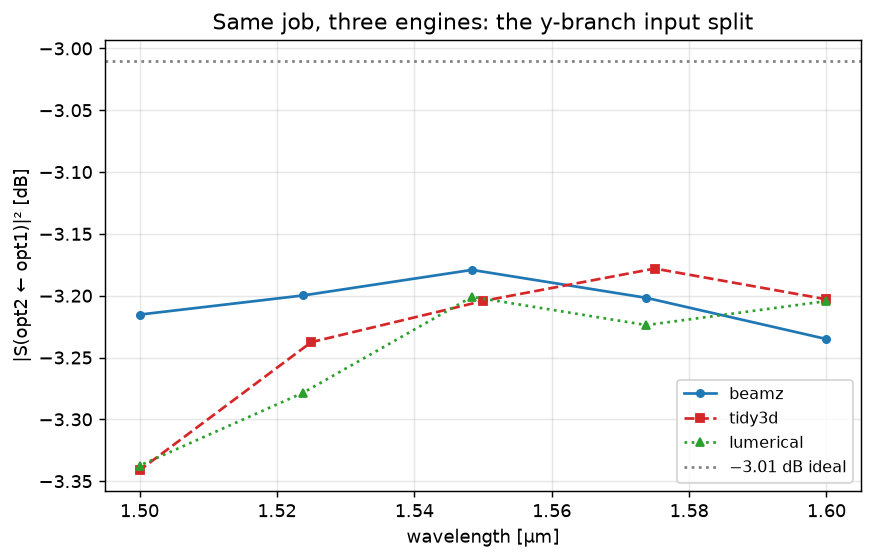
The same y-branch on all three engines. Cross-validation quantifies the worst-case disagreement (here a few hundredths of a dB on the split); 07 · Choosing an engine — three solvers, one job walks through it.
Bring your own engine
Any FDTD engine becomes a gds_fdtd solver by implementing the four methods above, see Adding your own solver for the full guide, including the conformance test suite your adapter inherits for free.
Note
The pre-0.5 class interface (fdtd_solver_tidy3d /
fdtd_solver_lumerical with per-solver keyword arguments) was removed
in 0.6. Use get_solver(name)(component, tech, spec).